
Compare planned and recorded time
Compare the scheduled shift with the time recorded for the period. Find the differences you need to follow up.
Hours and reports
Bring your team’s hours together for the next schedule and payroll preparation. Use that overview to follow up while the working week is still fresh in mind.
30 days free. No credit card. We’ll contact you to arrange access.
Try the labor cost calculator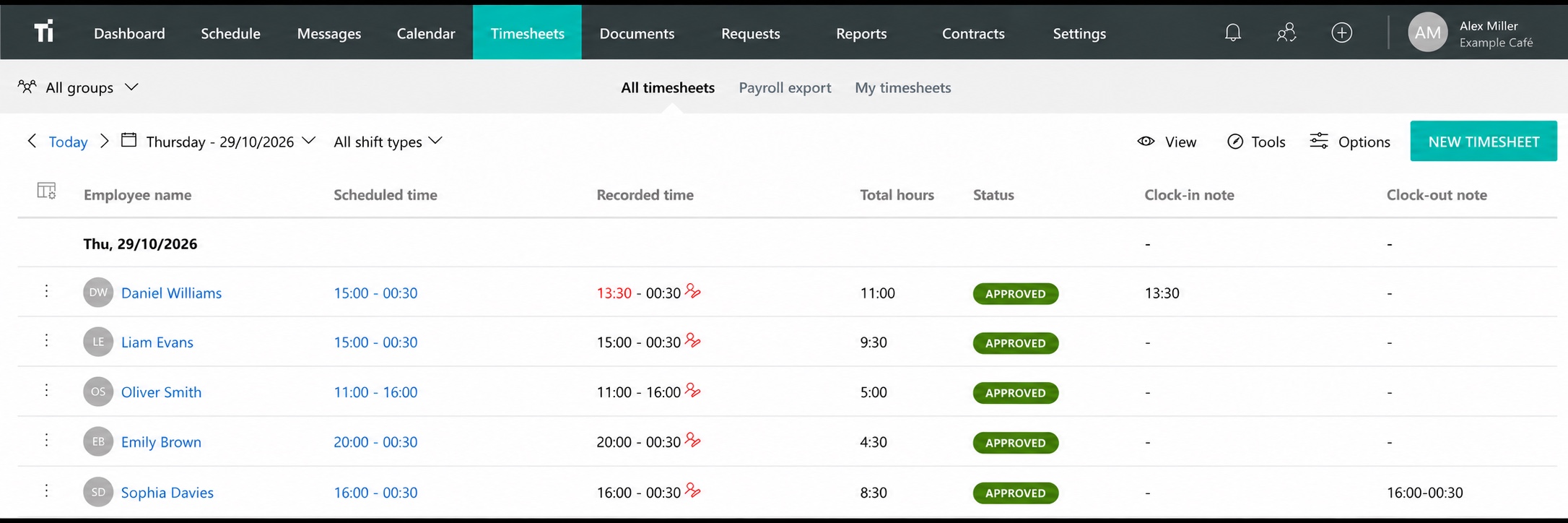
Hours and reports
Compare scheduled shifts with recorded time. Review differences and corrections, and check timesheet approval status before the hours are used for payroll.
See the workflow with DataLøn or Intect, and use the timesheet review checklist to work through the period. For your own reports, we can also set up a data extract for Microsoft Power BI.
Compare the scheduled shift with the time recorded for the period. Find the differences you need to follow up.
Work through missed clock entries, breaks and changes with employees before approving their hours.
Review employee timesheets and their approval status before using the hours for payroll.
After setup, DataLøn can retrieve recorded hours and pay supplements. Time records reach Intect through file upload.
Try bringing your team’s hours together, or request a demo of the tasks you would like to make easier.
30 days free. No credit card. We’ll contact you to arrange access.