
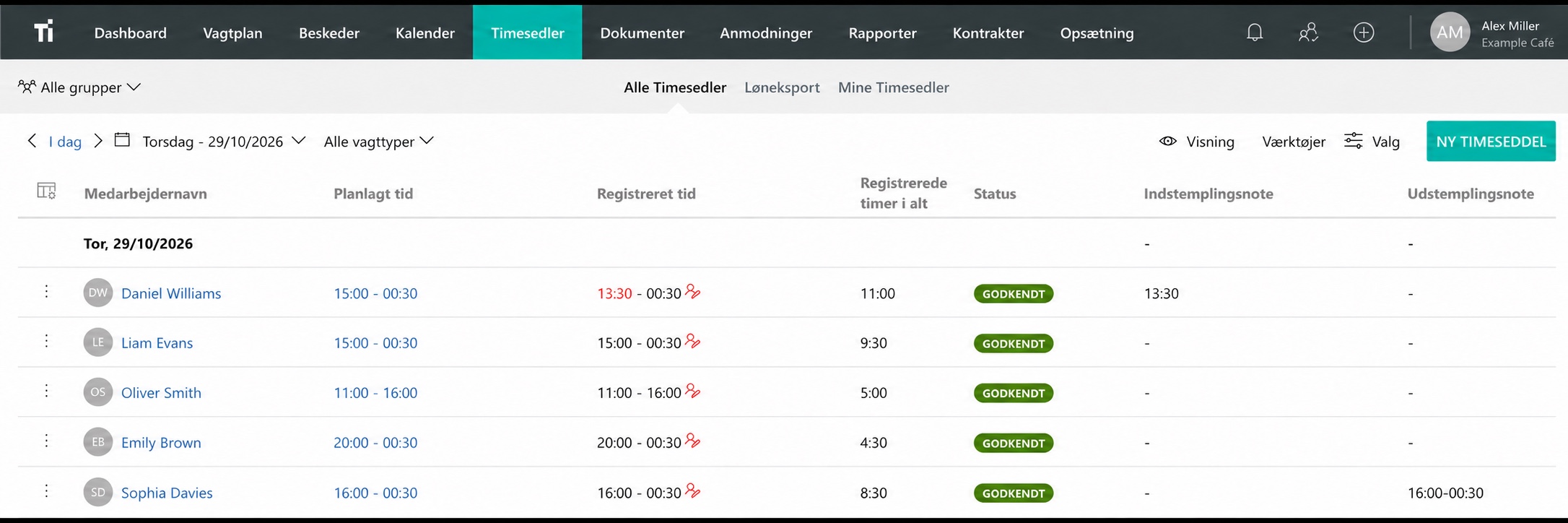
Record the time actually worked
A shift from 09:00 to 17:00 shows when someone is scheduled. Their recorded time may be different if they start early, stay late or take a different break. Keep both records so you can review the difference.
Tell employees where to find their schedule and where to record their hours. The person reviewing time should be able to see which entries still need an answer.
Explain the daily routine
Cover the questions employees are likely to have during a shift: when to clock in, how breaks are recorded, what to do at the end of the day and who to contact about a mistake.
An employee who writes “I finished at 16:20 on Tuesday and forgot to clock out” gives the reviewer enough information to investigate. Ask new employees to try the routine themselves, including opening and closing, while someone is available to help.
Convert minutes to decimal hours
From 09:00 to 17:00 is eight hours. If a 30-minute break should be deducted under your arrangements, the total is 7 hours and 30 minutes, or 7.5 decimal hours.
To convert minutes, divide them by 60 and add the whole hours. Seven hours and 30 minutes is 7 + 30/60 = 7.5. Entering 7.30 as a decimal produces a different number. Check the format your payroll system expects.
Use the converter below for another example. The timesheet review checklist covers the checks to make before payroll.
Convert hours and minutes
A quick conversion to decimal hours. The calculator does not send or store any information.
Time recording requirements in Denmark
Denmark introduced a general time-recording requirement on July 1, 2024. Section 4 b of the Working Time Act covers reliable recording of daily working time, employee access to their records and retention.
Read the Danish Working Time Act and the Danish Working Environment Authority’s explanation for the requirements and exceptions relevant to your employees. For workplaces elsewhere, check the rules in that jurisdiction.
Review missing and unusual entries
Set aside time during the week to check missing clock-outs, unusually long entries and differences from scheduled hours. Ask the employee while the shift is still easy to remember.
Keep a short explanation with a correction and make sure access fits each person’s role. If the same mistake keeps happening, check the instructions or setup. A clear reminder at the right point in the day may solve the problem.
Put the routine into practice
With TitanPlan time tracking, employees can record hours on a phone, a shared tablet or in a browser. Start with one team and work through a normal shift and a missed entry.
Check that employees know how to request a correction and that a manager can review the hours. If you are starting in Excel, download our free timesheet template for day shifts, overnight shifts and deducted breaks.
Questions and answers
Are scheduled hours the same as recorded hours?
Scheduled hours show planned work. Time records should show the actual hours worked, including differences that need review.
How do I convert 7 hours and 30 minutes to decimal hours?
Divide 30 by 60 and add 7. The result is 7.5 hours.
Does software alone meet time recording requirements?
The system, its settings and the way employees use it all matter. Check the requirements that apply to your workplace and employees.